Best Sisense Alternatives for Embedded, Multi-Tenant Analytics (2026)
Nine Sisense alternatives for SaaS teams embedding analytics, compared on multi-tenancy, embedding method, AI, and real 2026 pricing, plus a migration plan and PoC checklist.
The right Sisense alternative depends on what you embed and who uses it. SaaS teams that want governed, multi-tenant dashboards and AI for their customers at a predictable flat price should look at Holistics, GoodData or Luzmo. Teams that want analytics to feel like native React components inside their product, and are prepared to write more front-end code, should look at Embeddable or DataBrain. Teams already standardized on Microsoft, Google Cloud or Snowflake usually end up comparing Power BI Embedded, Looker or Sigma, mostly on how much their incumbent contract already covers. Teams that need something cheap and simple for a few hundred customers often start with Metabase. ThoughtSpot Embedded fits products where natural-language search is the feature customers pay for.
Sisense is an embedded analytics platform built for software companies that ship dashboards and data experiences inside their own applications. Sisense ingests data (often into its in-memory ElastiCube engine), models it, and serves it to thousands of customers through an SDK with white-labeling and tenant-level security. That model still works for many companies. Teams that leave in 2026 mostly cite unpredictable pricing, the operational weight of ElastiCubes, and the custom front-end work needed to make embedded analytics feel native.
This guide compares nine alternatives on the questions that decide embedded analytics projects in practice: how each one isolates tenants, how it embeds, what it costs as your customer count grows, and what moving off Sisense actually involves.
Why teams leave Sisense, and when they should stay
Teams leave Sisense for four recurring reasons, both in our own conversations and on review sites and community threads.
- Cost that is hard to forecast. Quote-based contracts, add-ons for connectors and AI, and credits that meter AI usage make it difficult to know what next year's bill will look like when the customer base doubles. Product teams that resell analytics need a cost they can put in a pricing model, and a bill that moves with usage they cannot control does not fit one.
- ElastiCube operations. Cubes need build schedules, memory headroom and someone to debug failed builds. Teams that have since moved their data into Snowflake, BigQuery or Databricks often find they are maintaining a second copy of their data model inside Sisense for little benefit, especially when a cube per tenant multiplies the work.
- Front-end effort for a native feel. Teams that want embedded dashboards to match their design system, beyond theming, usually need Compose SDK development or JavaScript customization. Some teams accept that engineering work; others want to avoid it.
- Modeling that lives in a GUI. Even with Git sync, analysts build the data model in Sisense's visual modeler and export it as JSON. Teams whose analytics engineers already work in dbt and code review tend to want the semantic model itself to be readable, reviewable code.
Some teams have good reasons to stay. Sisense still suits teams that have built a large Compose SDK front end they would have to rewrite, for companies that need self-hosted or on-premises deployment for contractual or regulatory reasons, and for workloads where an in-memory cube outperforms querying the warehouse (high-concurrency dashboards on modest data volumes, for example). If none of the four problems above costs you money or engineering time, a migration will probably cost more than it saves.
How embedded analytics pricing models differ
Most comparison pages skip pricing, yet pricing decides more embedded analytics evaluations than any other factor. Embedded vendors use four broad models, and each one behaves differently as your customer base grows. (Our embedded analytics pricing guide covers these models in more depth.)
| Model | How it charges | Who uses it | What happens at 5x growth |
|---|---|---|---|
| Per viewer or per seat | A fee for each end user (sometimes with cheaper viewer tiers) | Tableau, Looker per-user add-ons, ThoughtSpot Analytics, Metabase beyond included seats | Cost scales linearly with customers, so products with many low-frequency viewers pay the most |
| Capacity or compute | A fixed price for dedicated capacity, regardless of user count | Power BI Embedded (A/F SKUs) | Predictable until you outgrow the capacity, then a step change to the next SKU |
| Credits or query metering | Credits consumed by queries, dashboard views or AI usage | Sisense self-serve tiers (AI credits), ThoughtSpot usage-based Pro, Luzmo usage component | Hard to forecast, because usage depends on customer behavior you do not control |
| Flat platform fee by tenant or end-user band | A fixed annual fee that covers a range of end users or workspaces | Holistics embedded, DataBrain, Luzmo platform tiers, GoodData (platform fee plus workspaces) | Predictable within the band, with a known price for the next band |
You should build a two-year cost model at the start of the evaluation. Price each shortlisted vendor at your current number of tenants and active end users, then at 2x and 5x, and ask each vendor in writing which line items change.
Multi-tenancy patterns, and which tools support them
Tenant isolation separates embedded analytics from internal BI, and the right tool depends on how your product already stores customer data. Three patterns cover almost every SaaS architecture.
In Holistics, the embed token carries each viewer's tenant and row-level permissions, so one dashboard serves every customer with only their own data.
- Shared model with row-level security. All tenants live in the same tables, and every query is filtered by a tenant ID carried in a signed token or user attribute. This pattern is the simplest and most common, and it relies entirely on the vendor's row-level security.
- Schema, dataset or workspace per tenant. Each customer gets its own schema or logical workspace, often with shared dashboard definitions deployed into each one. This pattern suits products that customize metrics per customer or that need hard logical separation.
- Database per tenant. Each customer's data sits in a separate database or warehouse, and the analytics layer routes each viewer's queries to the right connection at runtime. This pattern is common in regulated industries and in older single-tenant SaaS architectures.
| Tool | Shared model + RLS | Schema / workspace per tenant | Database per tenant |
|---|---|---|---|
| Sisense (baseline) | Data security rules | Dedicated models per tenant | Dynamic ElastiCube, separate servers |
| Holistics | Row-level permissions from signed embed attributes | Schema routing via user attributes | Dynamic data sources from the embed payload |
| GoodData | Data filters in the logical data model | Workspace per tenant with a shared parent model (its core design) | Per-workspace data source mapping |
| Luzmo | Token-level parameter filters | Per-tenant dataset overrides | Per-tenant connection overrides |
| Embeddable | Security context passed with each embed | Per-tenant data models in code | Per-tenant connection routing |
| DataBrain | Tenant-level filters | Tenant schema mapping | Per-tenant data source configuration |
| Power BI Embedded | RLS roles with effective identity | Workspace per tenant | Separate semantic models per tenant |
| ThoughtSpot Embedded | Row-level security rules | Orgs per tenant, with publishing from a primary Org | Per-Org connections |
| Looker | Access filters and user attributes | Per-tenant models or explores | Connection switching via user attributes |
| Metabase | Data sandboxing (Pro/Enterprise) | Per-tenant collections and permissions | Database routing (Pro/Enterprise) |
| Sigma | User attributes driving RLS | Per-tenant workspaces | Per-tenant warehouse roles or connections |
This table only shows which patterns each tool supports. Your own PoC should test them: two users from different tenants log in side by side, and neither should see the other's rows, exports or AI answers (see the checklist further down).
What should a Sisense alternative offer?
Sisense customers usually ship analytics to their own customers, so a replacement has to pass two tests: what end users see inside the product, and what the vendor costs as the customer base grows. We used the criteria below to compare the tools in this guide.
- A semantic modeling layer that grounds AI answers. An assistant that queries a governed semantic layer chooses from metrics the data team has already defined and reviewed, applies the same permissions as every dashboard, and returns numbers that match the reports people already rely on, so its answers are grounded in agreed definitions rather than in whatever the model inferred from column names. Customer-facing analytics makes this even more important: an AI answer that disagrees with the dashboard next to it creates support tickets, and one that reaches across tenant boundaries creates a security incident.
- Embedding method and white-labeling. Vendors embed through signed iframes, JavaScript SDKs or React components, and the right choice depends on how native the analytics must feel and how much front-end work your team will take on. White-labeling should cover colors, fonts and domains.
- A white-label AI assistant. Customers increasingly expect to ask questions in plain language inside the product. The assistant should carry your brand rather than the vendor's, answer from the same governed metrics as your dashboards, and respect each tenant's permissions.
- Multi-tenancy. The tool should support the tenancy pattern your architecture already uses (shared model with row-level security, schema or dataset per tenant, or database per tenant), as described in the section above.
- End-user self-service. Customers increasingly expect to filter, drill and build their own reports, and AI-powered self-service lets them ask questions without your team building every view in advance.
- Data architecture. Warehouse-native tools remove the cube-building and refresh work that ElastiCubes require, at the cost of depending on warehouse performance and spend.
- Developer workflow. Models and dashboards defined as code, Git review and separate environments make it safer to ship analytics changes to every customer at once.
- A pricing model that scales with your customer count. Per-viewer, credit-based and query-metered pricing all grow with adoption, while flat or capacity pricing is easier to forecast; the pricing section above explains the trade-offs.
- Security and deployment. SSO for embed authentication, data residency options, compliance coverage (SOC 2, HIPAA where relevant) and, for some buyers, self-hosting.
The best Sisense alternatives in 2026
1. Holistics: the full BI experience inside your product, at a flat price
Holistics is an AI analytics platform that lets product teams bring the entire BI experience into their own app. Customers can drag and drop to build their own dashboards and reports, or chat with a white-label AI assistant to get the answers they need. AI answers come from a governed semantic layer and inherit the viewer's row-level permissions, so a tenant's users only ever query their own data.
Holistics defines everything as code: charts, dashboards, metrics and models. Product teams can therefore extend and customize the embedded experience well beyond theming, and match their product's brand with deep UI customization and complete styling control. Every change goes through a Git workflow (analytics-as-code), so your team reviews and approves updates before they reach customers. Compared with Sisense, Holistics also queries your warehouse directly, so you have no cube to build or maintain, and it charges a flat embedded fee by end-user band rather than a quote that moves with usage.
Every embedded tier includes a custom report builder with the AI assistant, advanced drills and interactions, and an embedded team workspace where a customer's users save and share what they build. Embeds load through a signed URL whose JWT payload carries the viewer's identity, permissions and filters, and for database-per-tenant architectures, dynamic data sources route each viewer's queries to the right database or schema based on attributes in the embed token.
The white-label AI assistant answers customers' questions from the semantic layer and respects their row-level permissions.
How Holistics compares to Sisense:
| Capability | Sisense | Holistics |
|---|---|---|
| Embedding method | iframe, Embed SDK, Compose SDK (React/Angular/Vue) | Signed iframe (JWT), fully white-labeled |
| Customization | Theming, plus Compose SDK or JavaScript development | Charts, dashboards, metrics and models defined as code, with complete styling control |
| Data engine | ElastiCube (in-memory) or Live models | Warehouse-native, with optional caching |
| Semantic layer | Visual modeler, exported to JSON for Git | AML, authored as code with types and reusable modules |
| Multi-tenancy | Data security rules, per-tenant models, Dynamic ElastiCube | Row-level permissions, schema routing, dynamic data sources |
| End-user self-service | Limited without custom development | Drag-and-drop dashboard and report builder, advanced drills, embedded team workspace |
| AI for end users | Simply Ask, assistant, narratives | White-label AI assistant, grounded in the semantic layer, permission-aware |
| Pricing | Quote-based (self-serve tiers withdrawn mid-2026) | Published flat tiers by end-user band |
Pricing (October 2026): Holistics publishes flat embedded plans. Small is $3,000/month (billed annually) for up to 5,000 embedded end users, Medium is $6,000/month for up to 15,000, and Large is $12,000/month for up to 50,000, each including 10 internal analytics users, with no per-viewer fees, no query metering and no mid-term overage bills; every tier has the same feature set, including white-labeling and the AI assistant, and deployments above 50,000 end users are sized individually (embedded pricing). Internal analytics plans start at $800/month (Entry) and $1,000/month (Standard), each billed annually with the first 10 users included and $12.50/month per additional user, so a 15-user Standard deployment is $12,750 per year.
Best fit: SaaS teams with data in a modern warehouse that want one governed metric layer serving both internal reporting and customer-facing dashboards, analytics engineers who prefer reviewing model changes in pull requests, and products with thousands of low-frequency viewers where per-viewer pricing does not work.
Limitations: Holistics embeds through a signed iframe rather than a React component SDK, so teams that want every chart rendered as a native component in their own front end will find Compose SDK, Embeddable or Luzmo's components more flexible. Holistics requires a SQL data warehouse or database and does not bundle ingestion or an in-memory engine. The code-based modeling layer also assumes someone on the team is comfortable with SQL and modeling as code. (For a closer look at white-labeling across vendors, see our white-label analytics platforms guide.)
2. GoodData: workspace-per-tenant embedded analytics for large tenant counts
GoodData is an embedded analytics platform designed around multi-tenancy, where each customer gets a workspace that inherits a shared logical data model and metric definitions from a parent. Metrics are written in MAQL, GoodData's metric language, and the platform exposes most functionality through APIs, a React SDK (GoodData.UI) and declarative definitions that can be managed as code. GoodData Cloud is the hosted product, and GoodData.CN offers a containerized deployment for teams that need to self-host, which makes it one of the few alternatives that can match Sisense on deployment flexibility.
GoodData product demo (video: GoodData).
| Capability | Sisense | GoodData |
|---|---|---|
| Embedding method | iframe, Embed SDK, Compose SDK | React SDK, web components, iframe |
| Multi-tenancy | Data security rules, per-tenant models | Workspace hierarchy with inherited models |
| Semantic layer | Visual modeler | Logical data model plus MAQL metrics |
| Deployment | Cloud, private cloud, on-prem | Cloud, or self-hosted GoodData.CN |
Pricing: Quote-based. GoodData describes its Professional plan as a platform fee plus a charge per workspace, and a competitor's analysis puts the Professional plan at about $1,500/month before workspace fees.
Best fit: Software companies with hundreds or thousands of tenants that need per-tenant customization on top of shared definitions, and teams that want an API-first, as-code deployment process.
Limitations: MAQL is specific to GoodData and takes time to learn. Per-workspace pricing needs careful modeling if every customer becomes a workspace. Visualization options are narrower than Tableau or Power BI, and the community and third-party resources are smaller than the larger platforms.
3. Luzmo: managed embedded dashboards with component SDKs
Luzmo (formerly Cumul.io) is built only for customer-facing analytics. It offers an embedded dashboard editor, a Flex SDK that renders individual charts as components in React, Angular or Vue, multi-tenant security through short-lived embed tokens with parameter filters, and Luzmo IQ for natural-language questions. Product teams shortlist it because it delivers polished, white-labeled dashboards to customers quickly, without a large modeling project.
Luzmo IQ, Luzmo's embedded AI assistant (video: Luzmo).
| Capability | Sisense | Luzmo |
|---|---|---|
| Embedding method | iframe, Embed SDK, Compose SDK | Embedded dashboards, Flex SDK components |
| Data engine | ElastiCube or Live | Live queries and Luzmo-hosted datasets |
| End-user editing | Requires custom work | Built-in embedded dashboard editor |
| Pricing | Quote-based | Published entry tiers plus usage |
Pricing: Luzmo's own 2026 comparison pages list plans from €1,995/month billed annually, with an adoption-based usage component. Older directory listings show lower entry tiers, so confirm current packaging before budgeting.
Best fit: SaaS product teams that want to ship customer-facing dashboards quickly, with end-user editing and AI, and whose metric logic is relatively simple or already modeled upstream.
Limitations: Luzmo has no code-based semantic layer comparable to AML, LookML or MAQL, so complex metric logic tends to live in the warehouse or in individual datasets. Usage-based components make cost less predictable at scale. It is built for external analytics, so teams that also want to replace internal BI usually need a second tool.
4. Embeddable: developer-first components that feel native
Embeddable is a developer toolkit for building embedded analytics as code. Developers define data models and build components in React (or wrap their own chart library), and Embeddable renders them as web components inside the host application, where non-developers can then assemble dashboards from those approved building blocks. It works most like Sisense's Compose SDK, except that your own front-end team owns more of the UI.
Embeddable's dashboards, self-serve and AI chat in two minutes (video: Embeddable).
| Capability | Sisense | Embeddable |
|---|---|---|
| Embedding method | Compose SDK and iframe | Web components built from your React code |
| Look and feel | Theming plus SDK customization | Uses your own components, so it matches by design |
| Modeling | Visual modeler | Data models defined in code (Cube-based) |
| Pricing | Quote-based | Quote-based (a third-party listing shows a $499/month Lite tier) |
Pricing: Embeddable has historically required a sales conversation. A February 2026 third-party listing shows a free tier and a Lite plan at $499/month, so confirm pricing with Embeddable directly.
Best fit: Product teams with front-end capacity who want embedded analytics to look and behave exactly like the rest of their application.
Limitations: Embeddable needs more engineering effort up front than managed dashboard tools, since your team owns the components. It is a smaller vendor with a shorter track record, and it suits internal self-service BI less well.
5. DataBrain: flat-priced embedded dashboards for SaaS teams
DataBrain is a newer embedded analytics vendor aimed at SaaS companies that want to replace incumbents such as Sisense. It embeds through web components, supports tenant-level filtering and per-tenant data source mapping, includes an AI chat feature for end users, and publishes flat monthly pricing. A customer case study cited by SmartData Collective describes a company that moved to DataBrain and reported savings of around $300,000.
DataBrain product walk-through, including search and embedding (video: DataBrain).
| Capability | Sisense | DataBrain |
|---|---|---|
| Embedding method | iframe, Embed SDK, Compose SDK | Web components, iframe |
| Multi-tenancy | Data security rules, per-tenant models | Tenant filters, per-tenant data sources |
| Pricing | Quote-based | Published flat tiers |
Pricing (October 2026): Growth costs $999/month and Pro costs $1,995/month; enterprise plans are quoted.
Best fit: Small and mid-sized SaaS teams that want fast customer-facing dashboards at a predictable price.
Limitations: DataBrain is a younger product with a smaller ecosystem and a lighter semantic modeling layer than code-first tools, and it has limited use as an internal BI platform.
6. Power BI Embedded: capacity pricing for Microsoft-centered stacks
Power BI Embedded lets ISVs embed Power BI reports into their applications using the "app owns data" model, where the application authenticates with a service principal and passes an effective identity so that row-level security roles filter each tenant's data. Microsoft documents both RLS-based multi-tenancy and workspace-per-tenant designs. (Our Power BI Embedded guide covers setup and pricing in more detail.)
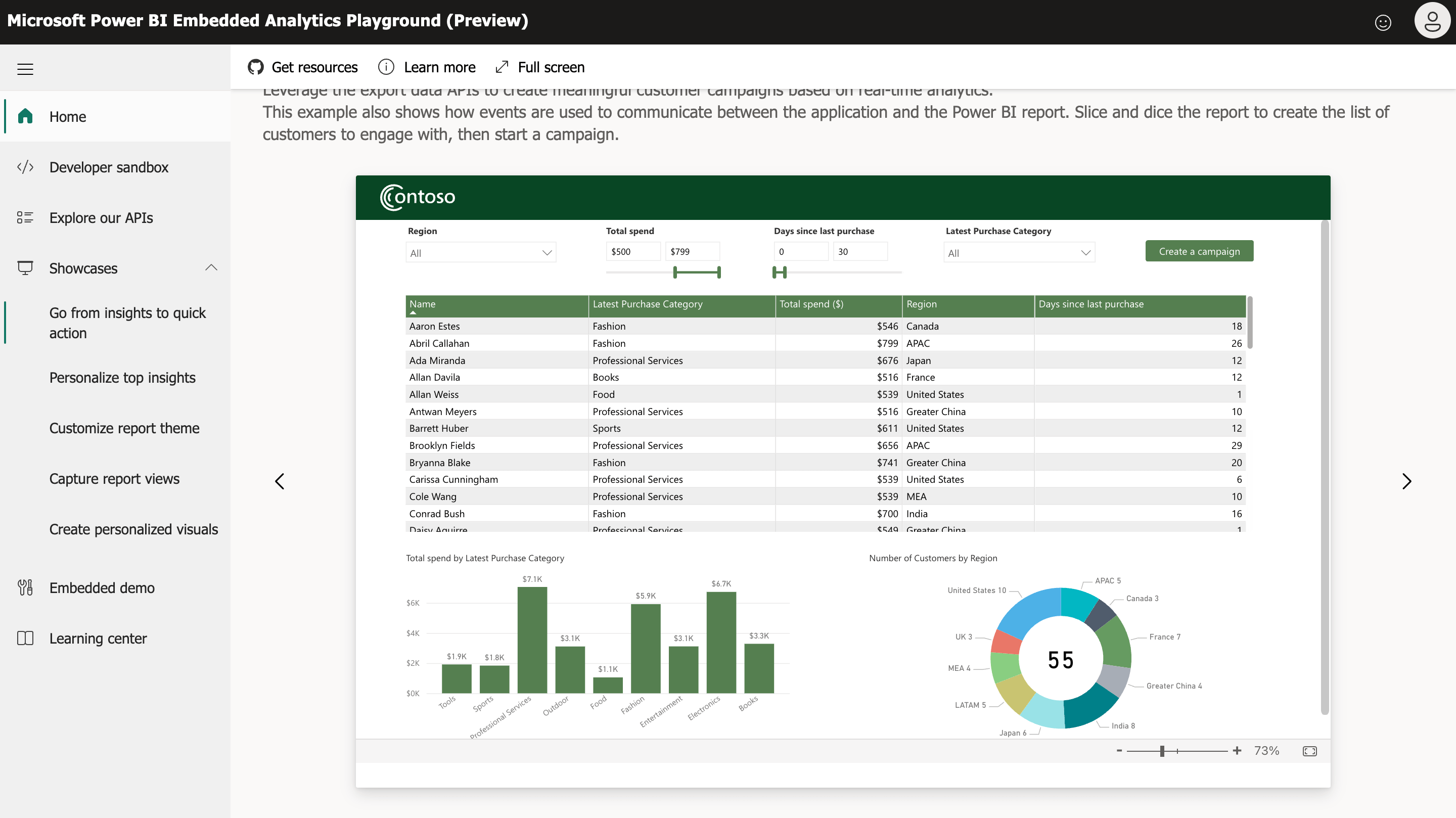 A Power BI report embedded in an application.
| Capability | Sisense | Power BI Embedded |
|---|---|---|
| Embedding method | iframe, Embed SDK, Compose SDK | JavaScript SDK over Power BI's embed API |
| Data engine | ElastiCube or Live | Import (in-memory) or DirectQuery |
| Semantic layer | Visual modeler | DAX measures per semantic model |
| Pricing | Quote-based | Azure capacity (A SKUs) or Fabric F SKUs |
Pricing: Power BI Embedded charges for capacity rather than per viewer. An A1 SKU is roughly $735/month at list price and Fabric capacity starts at F2 (about $263/month), with larger SKUs for production concurrency. Report authors still need Power BI Pro licenses ($14/user/month).
Best fit: ISVs already invested in Azure and Microsoft 365 whose customers recognize and expect Power BI.
Limitations: Capacity sizing is hard to predict and tends to step up sharply once concurrency grows. Report authoring depends on Power BI Desktop, which is Windows-only. DAX measures live in individual semantic models, so keeping metrics consistent across tenant workspaces takes discipline. Theming beyond Power BI's look requires work.
7. ThoughtSpot Embedded: natural-language search as the product feature
ThoughtSpot Embedded (formerly ThoughtSpot Everywhere) embeds ThoughtSpot's search, Liveboards and Spotter AI agent into applications through the Visual Embed SDK, a TypeScript library that is the primary embedding method rather than an iframe wrapper. ThoughtSpot handles multi-tenancy with Orgs, where content created in a primary Org can be published to tenant Orgs, and TML (ThoughtSpot's modeling language) can be deployed across environments through ThoughtSpot's GitHub integration. Our ThoughtSpot alternatives guide covers its internal BI product in more depth.
Adding ThoughtSpot to an application with ThoughtSpot Embedded (video: ThoughtSpot for Developers).
| Capability | Sisense | ThoughtSpot Embedded |
|---|---|---|
| Embedding method | iframe, Embed SDK, Compose SDK | Visual Embed SDK (TypeScript), REST APIs |
| End-user experience | Dashboards | Search, Liveboards, Spotter AI |
| Multi-tenancy | Data security rules, per-tenant models | Orgs plus row-level security |
| Version control | Git sync of dashboards and models | TML deploy via GitHub |
Pricing: Embedded Enterprise is quote-only. A free Developer edition covers up to 10 users and 25 million rows for one year. ThoughtSpot's internal Analytics product lists Essentials from $25 and Pro from $50 per user per month (billed annually), with a usage-based Pro option at $0.10 per credit.
Best fit: Products whose customers want to ask ad-hoc questions in plain language, backed by a well-modeled warehouse.
Limitations: Accurate search depends on significant up-front modeling. Spotter was still in beta for the embedded product as of mid-2026. Visualization control is narrower than dashboard-first tools, and enterprise pricing is usually higher than Sisense rather than lower.
8. Looker: governed embedding for Google Cloud teams
Looker offers signed and private embedding through its Embed SDK, with LookML providing a centralized, code-based semantic layer and access filters driven by user attributes for tenant isolation. Looker can also switch database connections per tenant through user attributes. (See our Looker embedded analytics guide for details.)
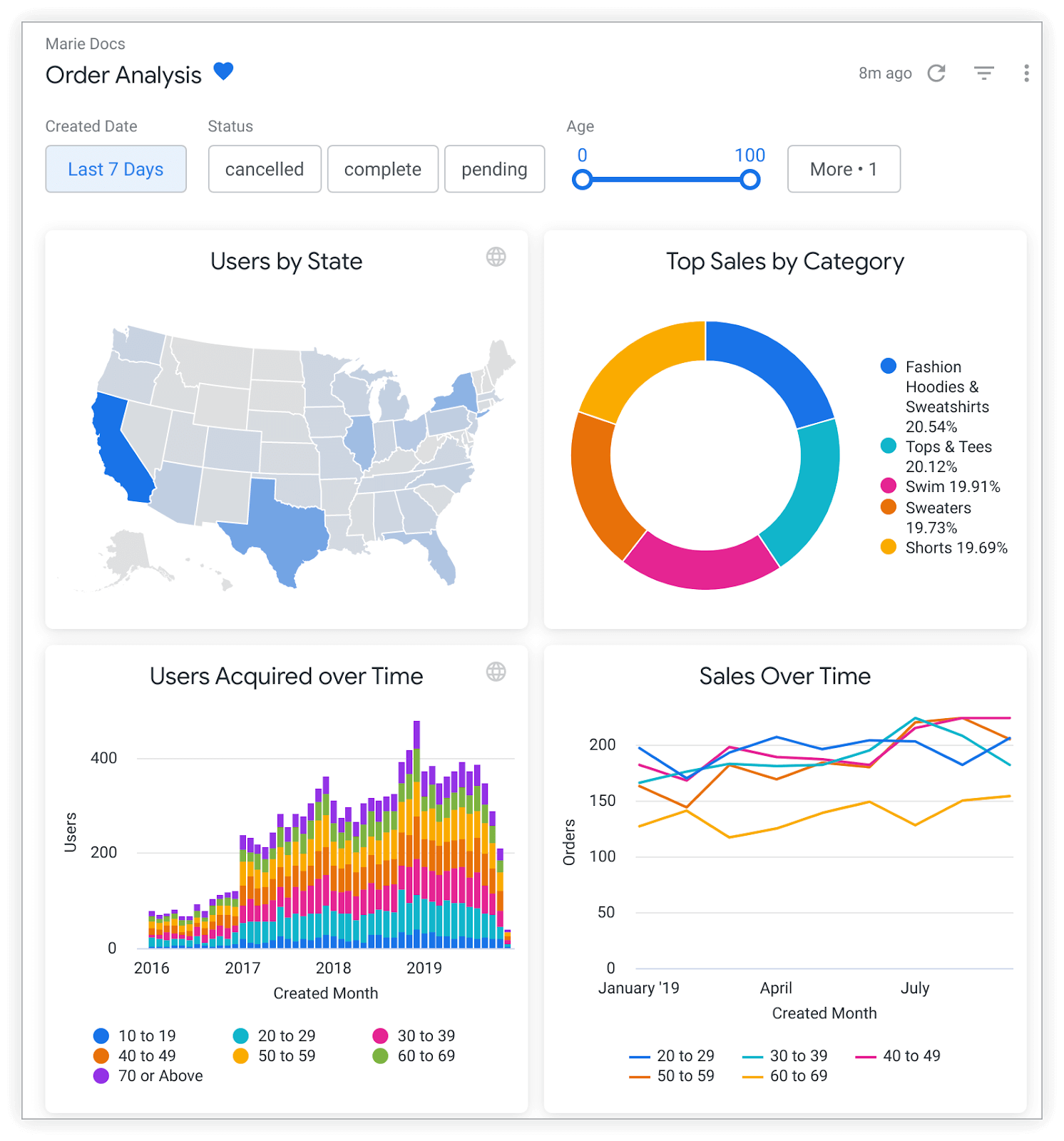 A Looker dashboard embedded in an application.
| Capability | Sisense | Looker |
|---|---|---|
| Embedding method | iframe, Embed SDK, Compose SDK | Signed embed URLs, Embed SDK |
| Semantic layer | Visual modeler | LookML, authored as code in Git |
| Multi-tenancy | Data security rules, per-tenant models | Access filters, user attributes, connection switching |
| Pricing | Quote-based | Quote-based; embed licensed separately |
Pricing: Looker is quote-based. Third-party data commonly puts Looker Standard at $35,000–$60,000/year and enterprise contracts at around $150,000/year, with embedded usage licensed on top.
Best fit: Enterprises on Google Cloud with analytics engineers who can own LookML and a large analytics budget.
Limitations: LookML specialists are scarce, models get harder to maintain as they grow, embed pricing often drives teams away from Looker, and Google has shifted product investment toward Gemini and Looker Studio.
9. Metabase: the low-cost starting point
Metabase is an open-source BI tool that many SaaS teams use for their first customer-facing dashboards. Static embedding with signed JWTs is available in the open-source edition, and the paid editions add interactive embedding, the Embedded Analytics SDK for React, data sandboxing for row- and column-level security, and database routing for database-per-tenant setups.
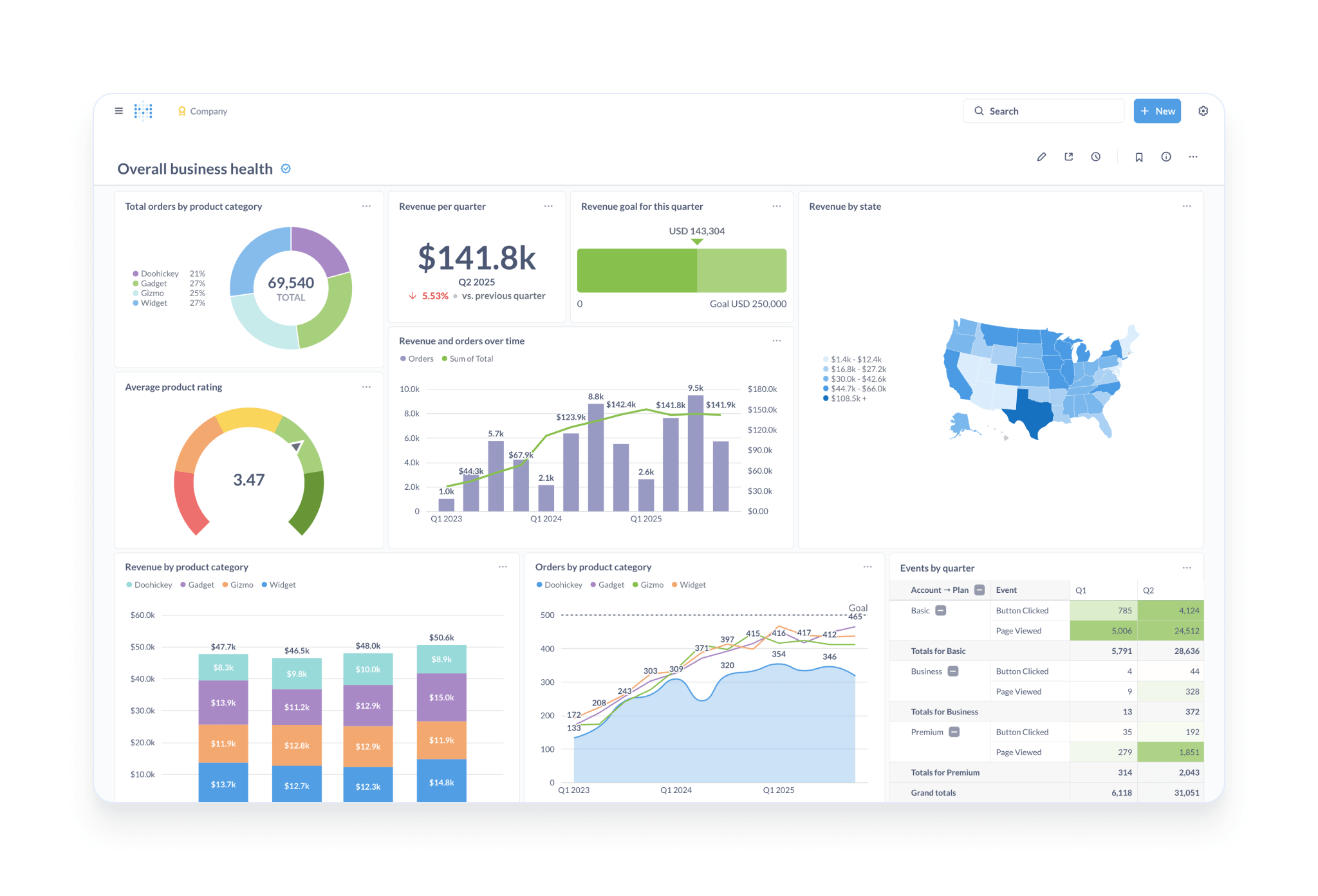 A Metabase dashboard, the same view its interactive embedding exposes.
| Capability | Sisense | Metabase |
|---|---|---|
| Embedding method | iframe, Embed SDK, Compose SDK | Static (signed) embeds, interactive embedding, React SDK |
| Semantic layer | Visual modeler | Lightweight models and metrics in the UI |
| Multi-tenancy | Data security rules, per-tenant models | Sandboxing, database routing (paid editions) |
| Pricing | Quote-based | Free self-hosted; published cloud tiers |
Pricing (October 2026): Open source is free to self-host. Cloud Starter is $100/month plus $6/user, Pro is $575/month plus $12/user, and Enterprise starts around $20,000/year. Metabase AI is billed at $3.75 per million tokens.
Best fit: Early-stage SaaS products with simple embedding needs and a small budget, and engineering teams willing to self-host.
Limitations: Metric definitions drift without a strong semantic layer, per-user pricing on paid tiers adds up for large viewer counts, and white-labeling and multi-tenant features sit in paid editions. Most teams replace it as they grow rather than keep it as a long-term platform.
Other options worth a look
- Sigma embeds warehouse-native workbooks through signed URLs, with user attributes driving row-level security. It suits products whose customers think in spreadsheets, and contracts are quote-based (third-party data puts the median around $62,000/year).
- Qrvey targets SaaS companies with a self-hosted, AWS-deployed embedded analytics stack and flat pricing.
- Explo offers embedded dashboards and report builders for SaaS teams with fast setup.
- Cube is a semantic layer and API rather than a dashboard tool, and pairs well with Embeddable or a custom front end.
How the Sisense alternatives compare
| Tool | Embedding method | Data engine | Semantic layer | Multi-tenancy patterns | AI for end users | Pricing model (Oct 2026) | Best for |
|---|---|---|---|---|---|---|---|
| Holistics | Signed iframe, white-labeled | Warehouse-native | AML (code) | RLS, schema routing, DB per tenant | AI report builder (permission-aware) | Flat, from $3,000/mo for ≤5,000 end users | Governed, code-defined embedded + internal BI |
| GoodData | React SDK, web components | Warehouse-native | LDM + MAQL | Workspace per tenant | Yes | Platform fee + per workspace (quote) | Very large tenant counts, self-host option |
| Luzmo | Dashboards, Flex SDK | Live + hosted | Dataset-level | Token filters, per-tenant overrides | Luzmo IQ | From €1,995/mo + usage | Fast, polished customer dashboards |
| Embeddable | Web components from your code | Via Cube models | Code (Cube) | Security context, per-tenant routing | Limited | Quote; third-party lists $499/mo Lite | Native-feeling, developer-owned UI |
| DataBrain | Web components | Warehouse-native | Light | Tenant filters, per-tenant sources | AI chat | $999 / $1,995 per month | SMB SaaS on a budget |
| Power BI Embedded | JS SDK | Import or DirectQuery | DAX per model | RLS, workspace per tenant | Copilot (capacity-gated) | Azure/Fabric capacity | Microsoft-centered ISVs |
| ThoughtSpot Embedded | Visual Embed SDK | Warehouse-native | TML models | Orgs + RLS | Spotter (beta in embed) | Quote | Search-first customer analytics |
| Looker | Signed embed, Embed SDK | Warehouse-native | LookML (code) | Access filters, connection switching | Gemini features | Quote; embed extra | Google Cloud enterprises |
| Metabase | Static, interactive, React SDK | Direct queries | Light | Sandboxing, DB routing (paid) | Metabot | Free OSS; from $100/mo cloud | Early-stage, low budget |
A PoC checklist for any Sisense replacement
A two-week proof of concept on your own data will tell you more than any comparison page, including this one. The checks below most often separate a good demo from a good deployment.
- Tenant identity through signed tokens. Your backend should mint the embed token, and the tenant ID and permissions in it should be impossible for the browser to change.
- A cross-tenant leakage test. Two users from different tenants should open the same dashboard side by side, and neither should see the other's rows, filter values, drill-throughs or cached results.
- Exports and scheduled reports. CSV, Excel and PDF exports, along with emailed reports, should respect the same row-level rules as the live dashboard.
- AI answers that inherit permissions. Natural-language questions should return only the asking user's data, and the vendor should be able to explain which model and data the AI can see.
- Theming and white-labeling. The embedded experience should match your design system and domain without visible vendor branding, and you should know how much of that needs custom code.
- Performance at realistic concurrency. Your heaviest dashboard should load acceptably with the number of simultaneous viewers you expect at peak.
- Pricing at 2x and 5x. Each vendor should confirm in writing what you would pay at double and five times your current tenant and end-user counts.
How to migrate off Sisense
Most Sisense migrations take one to three months for a typical SaaS product, and most of the work goes into the data model and security rules rather than the dashboards. (For the wider trade-off, see our build vs. buy embedded analytics guide.)
In Holistics, dashboards are defined as code, so rebuilt dashboards can be generated, reviewed and compared before cutover.
- The inventory comes first. Sisense's usage data shows which dashboards and widgets customers actually open, and in most deployments a minority of dashboards carry most of the traffic, so the migration scope is usually smaller than the dashboard count suggests.
- ElastiCube logic moves upstream. Joins, custom columns and transformations inside cubes are best rebuilt in your warehouse (often in dbt) or in the new tool's semantic layer, so that the logic is no longer tied to any BI vendor.
- Data security rules map to the new tenant model. Each Sisense data security rule needs an equivalent row-level permission, workspace or connection route, and this mapping should be tested with the cross-tenant check above before any customer sees it.
- Embed authentication gets replaced. Your backend's Sisense SSO or token logic is swapped for the new vendor's signed-token flow, which is usually a few days of backend work.
- Customers move in cohorts. Teams that run both platforms in parallel and move a small group of customers first (internal accounts, then friendly customers, then everyone) catch problems before they reach every customer.
- The contract sets the deadline. Sisense renewals are typically annual, so plan to finish the cutover a full reporting cycle before the renewal date.
Frequently asked questions
What is the best Sisense alternative for multi-tenant SaaS?
The answer depends on how your product stores customer data. For a shared database with a tenant ID column, Holistics, Luzmo and DataBrain handle row-level isolation through signed embed tokens with little setup. For a separate database per customer, Holistics (dynamic data sources), Looker (connection switching) and Metabase (database routing) can route each viewer's queries at runtime. For thousands of tenants that each need customized metrics on top of shared definitions, GoodData's workspace hierarchy was designed for that case.
What are the best Sisense alternatives for embedded analytics in SaaS?
Holistics, GoodData, Luzmo, Embeddable and DataBrain are the alternatives built primarily or substantially for embedded, customer-facing analytics. Power BI Embedded, Looker, ThoughtSpot Embedded and Metabase are general BI tools with embedding options, which makes them a better fit when you also want to replace internal BI with the same platform.
How much does Sisense cost?
Sisense's enterprise and OEM pricing is quote-based. Self-serve tiers introduced in early 2026 (Launch at $399/month and Grow at $1,299/month) were reportedly removed from the public pricing page in June 2026. Vendr data across 97 deals puts the average Sisense contract at about $137,000 per year, and large OEM deployments cost more once connectors, AI credits and additional capacity are added. (Our Sisense pricing guide covers the details.)
Is there an open-source Sisense alternative?
Metabase is the most widely used open-source option for embedded dashboards, with static signed embedding in the free edition. Apache Superset is another open-source choice, though it needs more engineering to embed securely. Both require you to run and secure the infrastructure, and multi-tenant features in Metabase sit in the paid editions. See more: Best Open-source BI Tools
Does Sisense support Git version control?
Yes. Sisense Linux 2022.10 and later can sync dashboards and data models to a Git repository as JSON files. Merges and conflict resolution happen in the remote repository rather than in the Sisense interface, and data security settings are excluded from the repo. Code-first tools such as Holistics, Looker and GoodData go further by making the semantic model itself the code that analysts write and review.
Do I need to replace ElastiCubes with a data warehouse?
Most Sisense alternatives query a warehouse or database directly, so ElastiCube transformations need a new home. Teams that already run Snowflake, BigQuery, Redshift, Databricks or PostgreSQL usually move that logic into dbt or the new tool's semantic layer. Teams without a warehouse should budget for one, or choose a vendor that hosts datasets for you, such as Luzmo.
How long does it take to migrate from Sisense?
A typical SaaS product with a few dozen customer-facing dashboards takes one to three months, most of it spent rebuilding cube logic and validating tenant security. Products with deep Compose SDK customization take longer, since that front-end code has to be rebuilt against the new vendor's SDK or embed method.
Which Sisense alternative has the most predictable pricing?
Vendors with flat platform pricing by end-user band or tenant count are the easiest to forecast. Holistics (flat embedded tiers by end-user band, no per-viewer fees and no query metering) and DataBrain (flat monthly tiers) publish their prices. Capacity-based Power BI Embedded is predictable until you outgrow a SKU. Per-viewer, credit-based and query-metered models are the hardest to forecast as your customer base grows.
How we evaluated these tools
Holistics makes one of the products in this list, so we have tried to make our reasoning checkable. We assessed each tool on embedding method, multi-tenancy patterns, semantic modeling, AI for end users, deployment options and published pricing, using vendor documentation and pricing pages checked in October 2026, supplemented by third-party contract data where vendors do not publish prices. Where sources disagreed, we used the most recent figure and said so. We list Holistics' own limitations alongside everyone else's, and we encourage anyone shortlisting tools to run the PoC checklist above on their own data rather than relying on any vendor's comparison, including ours.

Data Engineer turned Product; writes SQL for a living.